
It’s not secret that I love a bit of beautiful UI. The web is full of creativity, experiences that we start to miss out from when using AI to look up everything. Finding information for a Metal festival and reading it in a sans-serif black/white screen is not engaging, you lose every bit of feeling, the urge to go jump in the mosh pit. I felt I had to at least try to take a look at ChatGPT apps. Is this the way forward? Some thoughts...
UI impacts our lives on a daily basis and “browsing the web” is still a thing. Yes, our behavior has changed, we see a cool product on Instagram, we go to the webshop, and there you have a branding that might speak to you and you wonder if they have other “cool stuff” you’d like. It’s not the way we used to browse, but branding still attracts.
The same goes for AI, you might wonder which place to visit to see beautiful waterfalls and lush nature. Maybe an AI assistant will recommend Madeira as one of the options and if you never heard of that island before, you might start searching for some pictures. What if instead… you get a nice bit of UI from a travel blog that makes you instantly feel like going on a nature hike, maybe you’d be more engaged to learn from this blog and see more in depth information by the combination of prompting and browsing. I see some strengths in this. Maybe it’s my age, but too many times I’ve heard things are going to be one way of the other (browsing vs prompting), in the end, it’s usually somewhere in the middle.
I am not riding hypes when it comes to AI, I’m also not trying to be grumpy grandpa, I like to test these things to see if they have business value. This is sort of the report of that. Me, just tinkering. Why am I digging in this niche feature? Am I changing this to an AI-blog? Hells no! But in the end, I’m a developer, when not exploring/creating fun experimental CSS demo’s by hand, I work at an office, fully AI enhanced and especially when it comes to the future of UI, I want to explore everything out there as well.
What is a ChatGPT App?
A ChatGPT App is built on MCP (Model Context Protocol), It’s a standardized way for AI models to call external tools. It gives the capability to a model to search things, run queries, etc… mid-conversation. The idea here is that your blog (or shop, event website, etc…) hosts an MCP server endpoint. ChatGPT in this case talks to that endpoint and when the model decides a tool is useful for the user’s question, it calls your server, gets a response and then uses that in the answer. For real AI gurus this might be an oversimplification, but that’s the basic idea here.
GPT allows a sort of a widget system, it gives you the capability to register a piece of HTML, CSS, and JS that ChatGPT renders inline whenever a specific tool returns a result. That’s exactly the thing I wanted to try, because that “web-trinity” is right inside my ballpark. I wanted to see if I could get some of my visual identity inside of ChatGPT just by re-using some of the design-tokens on my website.
I should probably mention that this is purely an experiment and I’m not planning to release this. It’s my first attempt, and I don’t see any real value in my blog being an app. However, I started my “UI developer” career with being able to create beautiful UI’s no matter which CMS or platform was behind it. I’ve always taken a sense of pride in that, learning multiple frameworks and template languages enough to make things look pretty. This is not different from that.
For my blog, I kept it simple with three tools:
search_articlessearches the index by keyword and returns matching article titles and URLsfetch_articleretrieves the full text of a post by slugexplain_cssfinds the most relevant technique article, fetches live Baseline browser support data, and returns a structured object that the widget can render
So in the end, the chat is still in the AI assistant, and my blog is the backend. But now a little card is shown inside that looks like it came from my blog. It’s a nice addition.
How you wire it up inside of ChatGPT
The easy part is making the app by setting a route to your MCP server.
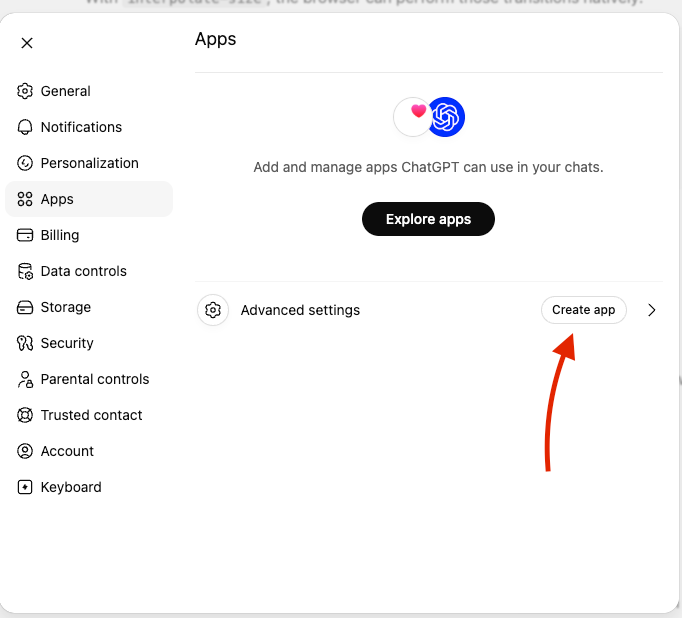
- Open up the settings in ChatGPT
- Go to App
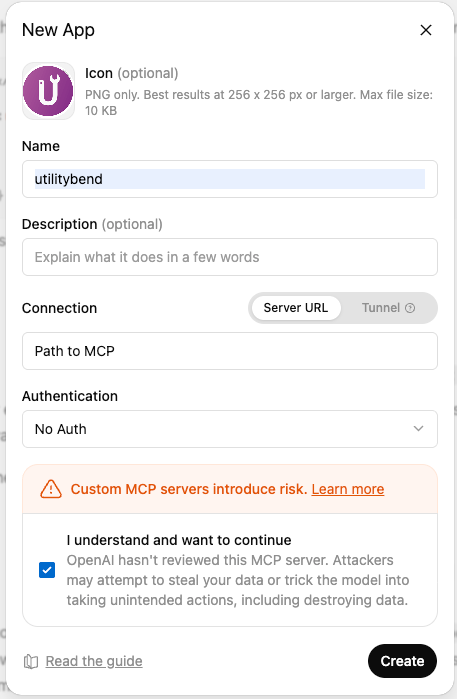
- Create an app
- Add the info: icon, name, path to your MCP, authentication (for this example none…)
- Agree to the terms and create it
The plan
Got to start with a plan right? I actually kept it simple:
- User asks ChatGPT about a CSS technique
- ChatGPT calls
/mpcwith a tool call /mpcsearches a pre-built JSON index of the posts/mcpreturns structured content + widget resource URI- ChatGPT renders the custom widget inline.
The thing is that ChatGPT still owns the chat UI, I wasn’t writing any of the logic. It’s just the creation of a tool that optionally gets rendered for users who installed the app. This gives me a bit of mixed feelings, on one hand, it’s a nice separation of concerns, on the other hand I’m not completely in control of what the user gets to see, if it starts showing the wrong thing (with my branding) it feels kinda bad..
My blog is created with Astro, keeping this in mind, there are four things that are important here:
src/pages/mcp.tsis the MCP server, a single Astro serverless routescripts/build-mcp-index.mjsruns at build time to scan all MDX posts and produce a search indexscripts/build-mcp-widget.mjsbundles the widget into a single JSON resource filemcp/widgets/technique-card/is where the widget source lives (TypeScript and plain CSS)
The /mcp route is the only serverless function on the blog, all the other things are still static (as I want them to be).
Building the search index
One of the first things I had to figure out was: how does the MCP server know what’s in the blog? I don’t have (and didn’t want to create) a database. I didn’t want to read MDX files at request time inside a cold-start serverless function. So I went with a pre-built JSON index that gets generated every time you run pnpm dev or pnpm build.
The script (scripts/build-mcp-index.mjs) walks through my posts, reads every MDX file, parses the frontmatter by hand (nothing fancy, just string splitting), and writes out a JSON array. Each entry ends up looking something like this:
{
  "id": "2024/css-anchor-positioning",
  "slug": "2024/css-anchor-positioning",
  "url": "/blog/2024/css-anchor-positioning",
  "title": "CSS Anchor Positioning",
  "description": "...",
  "tags": ["css"],
  "pubDate": "2024-05-01",
  "content": "plain text stripped from MDX",
  "codeBlocks": [{ "language": "css", "code": "..." }],
  "featureIds": ["anchor-positioning"]
}
The featureIds field is something I’m quite happy about. Some articles that I’ve written use a <baseline-status featureId="..."> component in the MDX to show browser support. The build script grabs those IDs while indexing, so at request time the MCP server can look them up live from api.webstatus.dev. It was a nice reuse of something that was already in the content for a completely different purpose. External posts, the ones I’ve written for Smashing Magazine or Chrome for Developers, get skipped. They don’t have content to index.
The output goes to src/data/mcp/posts-index.json, which the MCP route imports as a static JSON import.
What the index script does
If you want to build the same thing, here’s the basic idea. There’s no MDX parser involved, I just read the raw file and slice off the frontmatter block with a regex, then split each line on the first colon:
function extractFrontmatter(rawContent) {
  const match = rawContent.match(/^---\n([\s\S]*?)\n---\n?/);
  if (!match) return { frontmatter: {}, body: rawContent };

  const frontmatter = {};
  for (const line of match[1].split("\n")) {
    const separator = line.indexOf(":");
    if (separator < 0) continue;
    const key = line.slice(0, separator).trim();
    const value = line.slice(separator + 1).trim();
    if (key) frontmatter[key] = parseValue(value);
  }

  return { frontmatter, body: rawContent.slice(match[0].length) };
}
(The full version also walks nested keys like image.url, but you get the idea.)
The body gets two passes. One strips it down to plain text for the search content, the other pulls out the code blocks:
function stripMdx(body) {
  return body
    .replace(/^import\s+.*$/gm, "")   // drop MDX imports
    .replace(/```[\s\S]*?```/g, " ")  // drop code blocks from the text
    .replace(/<[^>]+>/g, " ")          // drop JSX/HTML tags
    .replace(/\{[^}]+\}/g, " ")        // drop expressions
    .replace(/\s+/g, " ")
    .trim();
}

function getCodeBlocks(body) {
  const blocks = [];
  const codeRegex = /```([a-zA-Z0-9_-]+)?\n([\s\S]*?)```/g;
  let match;
  while ((match = codeRegex.exec(body))) {
    blocks.push({
      language: (match[1] ?? "text").toLowerCase(),
      code: match[2].trim(),
    });
  }
  return blocks;
}
I also have a script to get those featureId’s as I’ve mentioned before. It’s very niche for this use case so I’m skipping the actual code for this.
After that it’s just a loop. Read every .mdx, skip the external ones, push an entry, sort by date, write the file:
for (const filePath of mdxFiles) {
  const raw = await readFile(filePath, "utf8");
  const { frontmatter, body } = extractFrontmatter(raw);
  if (frontmatter.external === true) continue;

  // createSlug just falls back to the file path when there's no slug in frontmatter
  const slug = createSlug(filePath, frontmatter);
  entries.push({
    id: slug,
    slug,
    url: `/blog/${slug}`,
    title: frontmatter.title ?? slug,
    description: frontmatter.description ?? "",
    tags: Array.isArray(frontmatter.tags) ? frontmatter.tags : [],
    pubDate: frontmatter.pubDate ?? null,
    content: stripMdx(body),
    codeBlocks: getCodeBlocks(body),
    featureIds: getFeatureIds(frontmatter),
  });
}

await writeFile(outputPath, JSON.stringify(entries, null, 2));
Nothing clever (mostly following documentation) and some help from AI to create those Regex’s, but that’s sort of the point. It runs in about a second and the serverless function just imports the finished JSON.
Setting up the MCP server
Packages! Of course there are packages to be installed:
pnpm add mcp-handler @modelcontextprotocol/sdk @modelcontextprotocol/ext-apps fuse.jsThe MCP route itself (src/pages/mcp.ts) is a single Astro API route with export const prerender = false at the top. It handles both GET and POST.
import type { APIRoute } from "astro";
import { createMcpHandler } from "mcp-handler";
import { registerAppResource, registerAppTool } from "@modelcontextprotocol/ext-apps/server";

export const GET: APIRoute = handler;
export const POST: APIRoute = handler;

const handler = createMcpHandler(
  (server) => {
    registerAppResource(server, WIDGET_RESOURCE_URI, getWidgetResourceContents);
    registerAppTool(server, "search_articles", { /* schema */ }, searchHandler);
    registerAppTool(server, "fetch_article", { /* schema */ }, fetchHandler);
    registerAppTool(server, "explain_css", { /* schema */ }, explainHandler);
  },
  {
    serverInfo: { name: "utilitybend-mcp", version: "1.0.0" },
    instructions: "Use search_articles before fetch_article when the user has not provided an exact slug.",
  },
  { maxDuration: 60, disableSse: true },
);
Documentation for this can be found on the OpenAI docs. I pretty much stole it from over there.
The main tool in this app is explain_css. Design the structuredContent object first, it’s the payload your widget reads on the other side, so I tried to keep it small:
async ({ query }) => {
  const article = findBestArticle(query);
  if (!article) {
    return {
      structuredContent: { title: "No match", summary: "Nothing found yet." },
      content: [{ type: "text", text: "No close match found." }],
    };
  }

  const codeBlock = article.codeBlocks.find((b) => b.language === "css") ?? article.codeBlocks[0];

  return {
    structuredContent: {
      title: article.title,
      summary: article.description.slice(0, 280),
      code: codeBlock?.code,
      language: codeBlock?.language,
      url: toAbsoluteUrl(article.url),
      baseline: await getBaselineInfo(article.featureIds[0]),
    },
    content: [{ type: "text", text: `Found: ${article.title}` }],
  };
}
The matching runs three stages: phrase match on the title/slug first, then term counting against title/slug/tags, then Fuse.js as a fuzzy fallback. I also added some query aliases so “gap decorations” quietly maps to my article on “gaps with rules”. Small thing, but it helped to get some better results. Baseline data comes from api.webstatus.dev and gets cached in-memory on the warm function, so the same feature doesn’t get fetched twice.
The _meta on the tool response is what tells ChatGPT to render the widget instead of just printing the text result:
_meta: {
  ui: {
    resourceUri: WIDGET_RESOURCE_URI,
    visibility: ["model", "app"],
  },
  "openai/outputTemplate": WIDGET_RESOURCE_URI,
  "openai/toolInvocation/invoking": "Finding the best utilitybend technique...",
  "openai/toolInvocation/invoked": "Technique card ready.",
},
One thing worth mentioning: the widget resource also needs a Content Security Policy so ChatGPT lets it load your own assets (fonts, CSS). You set domain, connectDomains, and resourceDomains on the resource’s _meta alongside the inlined HTML. If you skip this, things will silently not load. It happened to me… always read the docs…
The creating of the widget
All the previous server “mumbo-jumbo” never was my strong suit. But with a bit of docs reading and asking AI for assistance (yeah, I’m honest), I was able to pull it off. The next part is the thing I really wanted to dig in myself, the actual widget, the UI, the place where I thrive. This is created in TypeScript without any framework. In the end it’s just some DOM APIs and Prism.js for code highlighting that gets bundled by Vite. Then the output gets inlined into a JSON resource that the MCP server serves.
ChatGPT delivers the tool’s structured content via window.openai.toolOutput and fires an openai:set_globals custom event each time it updates. The widget tries to render immediately on boot (in case the data is there), then listens for updates through both channels, with a postMessage fallback:
const root = document.getElementById("mcp-technique-card-root");

// 1. render immediately if data is already on the global
if (!renderFrom(window.openai?.toolOutput)) {
  render(null); // show waiting state
}

// 2. primary update channel
window.addEventListener("openai:set_globals", (event) => {
  const detail = (event as CustomEvent).detail;
  renderFrom(detail?.globals?.toolOutput ?? window.openai?.toolOutput);
}, { passive: true });

// 3. postMessage fallback for the MCP Apps bridge
window.addEventListener("message", (event) => {
  renderFrom(event.data?.params?.structuredContent);
});
You shouldn’t trust that object blindly. It arrives from outside my code, so I run it through a small validator before rendering. If the title or summary is missing, I bail to the waiting state:
function coerceTechniqueResult(value: unknown): TechniqueResult | null {
	//"Is this a thing? Is this thing an object?" If no → throw away, return null.
  const obj = value && typeof value === "object" ? (value as Record<string, unknown>) : null;
  if (!obj) return null;

	// Does this thing have a title and summary? if not, don't bother with it...
  const title = typeof obj.title === "string" ? obj.title : null;
  const summary = typeof obj.summary === "string" ? obj.summary : null;
  if (!title || !summary) return null;

  return {
    title,
    summary,
    code: typeof obj.code === "string" ? obj.code : undefined,
    language: typeof obj.language === "string" ? obj.language : undefined,
    url: typeof obj.url === "string" ? obj.url : undefined,
    baseline: coerceBaseline(obj.baseline),
  };
}
Then render() builds the card by hand. Just a string and innerHTML. Anything that came in from outside gets escaped first, since I’m injecting it straight into HTML (I mean.. you never know…):
function escapeHtml(value: string) {
return value
.replaceAll("&", "&")
.replaceAll("<", "<")
.replaceAll(">", ">")
.replaceAll('"', """)
.replaceAll("'", "'");
}
function render(data: TechniqueResult | null) {
if (!data) {
root.innerHTML = `
<article class="mcp-technique-card" aria-live="polite">
<h2 class="h3">Ask utilitybend</h2>
<p>Waiting for a utilitybend technique...</p>
</article>`;
return;
}
const baseline = data.baseline
? `<span class="mcp-technique-card__baseline ${baselineClassName(data.baseline.status)}"
title="${escapeHtml(data.baseline.details)}">${escapeHtml(data.baseline.label)}</span>`
: "";
const codeSection = data.code
? `<section class="mcp-technique-card__code">
<pre class="language-${escapeHtml(data.language ?? "text")}"><code>${escapeHtml(data.code)}</code></pre>
</section>`
: "";
const readButton = data.url
? `<a class="btn btn-secondary" href="${escapeHtml(data.url)}" target="_blank" rel="noopener noreferrer">
<span>Read full article</span>
</a>`
: "";
root.innerHTML = `
<article class="mcp-technique-card" aria-live="polite">
<header class="mcp-technique-card__header">
<h2 class="h3">${escapeHtml(data.title)}</h2>
${baseline}
</header>
<p>${escapeHtml(data.summary)}</p>
${codeSection}
${readButton}
</article>`;
Prism.highlightAllUnder(root);
}That Prism.highlightAllUnder(root) is what turns the raw <pre><code> into highlighted output. And because the markup uses my websites class names (btn btn-secondary, h3, mcp-technique-card__baseline), the imported CSS just picks it up without any extra work.
Adding the utilitybend branding
In the end, designing the thing was the easy part. But it was fun to see my personal branding inside of the ChatGPT space. I already did the prep work by writing the CSS, Since I was building the file with Vite, I could just import some of my styles:
@import "../../src/source/css/global/primitives.css";
@import "../../src/source/css/global/spacing.css";
@import "../../src/source/css/global/colors.css";
@import "../../src/source/css/global/typography.css";
@import "../../src/source/css/atoms/button.css";
@import "../../src/source/css/atoms/corner-shapes.css";
@import "../../vendor/prism.css";
So the widget inside ChatGPT uses the same --s-color-brand-primary, the same button styles, the same squircle corner shapes, the same font stack as the actual blog. It doesn’t look like ChatGPT’s default UI. It looks like this blog was loaded in the window.
For the Baseline badge, I added four states that map to semantic color tokens:
.mcp-technique-card__baseline {
  &.is-widely  { background: var(--s-color-success, oklch(55% 0.15 145)); }
  &.is-newly   { background: var(--s-color-info, oklch(60% 0.15 230)); }
  &.is-limited { background: var(--s-color-warning, oklch(65% 0.15 85)); }
  &.is-no-data { background: var(--s-color-neutral, oklch(55% 0 0)); }
}
This is the result, you can ask the app for some code snippets and comment on them. It’s also tried to create blog searches, but still had to figure some things out for that.
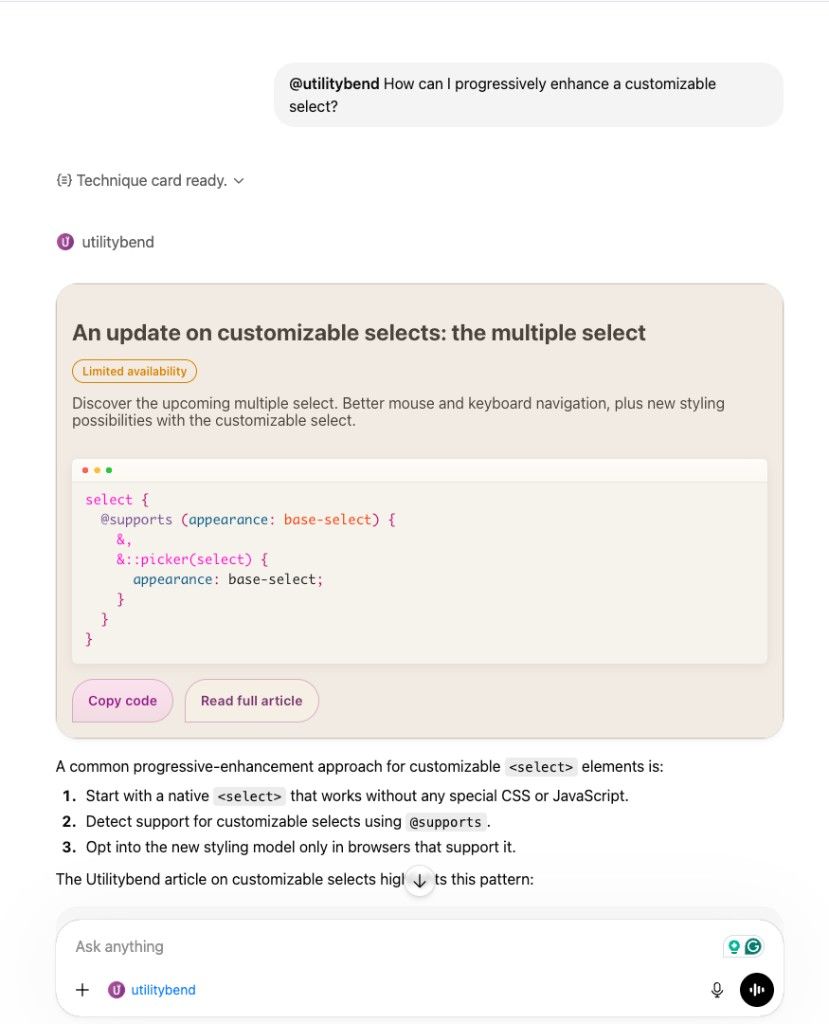
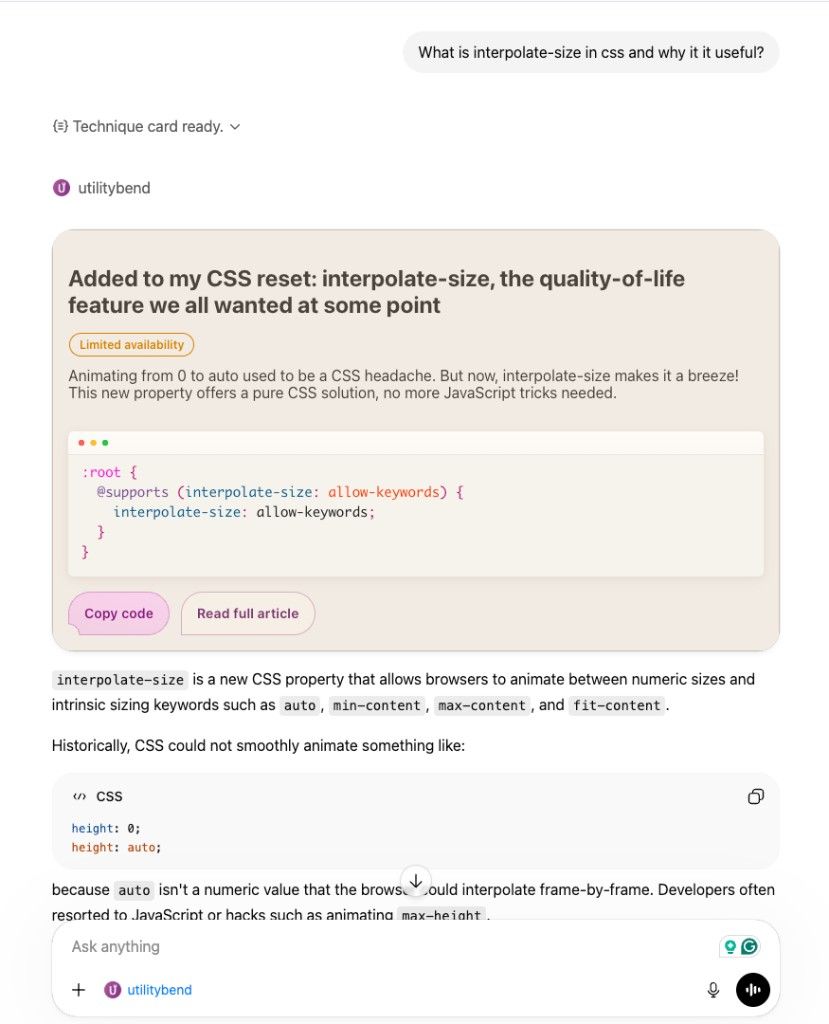
And yes, it’s theme-aware via light-dark(). Even inside ChatGPT.
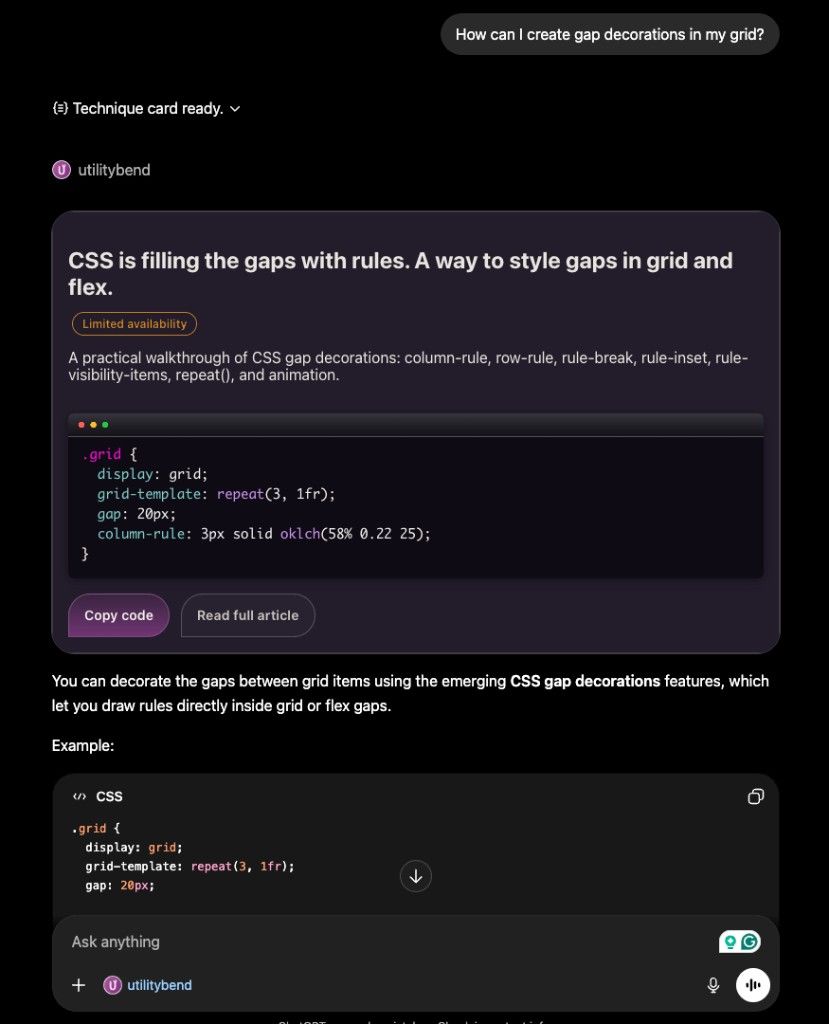
The build script runs Vite, takes the bundled HTML output, hashes it with SHA-256, and writes a JSON resource file with the inlined HTML and a versioned URI. When the widget changes, the hash changes, and ChatGPT knows to fetch the updated version. Simple cache busting… (you need it).
Deploying and registering
The site uses @astrojs/vercel and /mcp is the only thing that runs as a serverless function. The route needs export const prerender = false and that’s pretty much it. Everything else stays static as I still want the speed boost from that.
One thing to be aware of: ChatGPT requires a /privacy page to submit an app. Just a short page explaining what data you collect (for me, none) and who to contact is sufficient.
Once deployed, you go to chatgpt.com/gpts, create a new GPT, add your MCP endpoint URL under “Actions”, and ChatGPT will automatically discover the tools. To get the widget rendering, you need to be registered as a ChatGPT App developer and have the ext-apps extension active.
I didn’t do any of that as I just wanted to try it out… yep, this widget is not live and I have no intention to do so. Just tinkering, learning, nothing more.
Conclusion: Business value? AI slop?
Even if not fully created with AI, and taking my time to read the docs, I feel like this is still a bit of AI slop. It was fun as an exploration into other ways UI and AI can go hand in hand. For the UI part, I see value there, I’ve only scraped the tip of the iceberg here, as you a make these widgets interactive and since it’s just HTML, CSS and JS you can really turn them into amazing experiences. It gives flavor to your brand.
That being said, the business value of this seems limited. I believe that for some brands out there this might be a great way to attract more audience. For governments, schools, logistics, energy suppliers, etc… it could be interesting as you can scope data and gain some trust in the output. The thing is that you are limited to an audience using a certain ecosystem here. Personally, I don’t even use ChatGPT (for multiple reasons).
You might be wondering, why I even bothered with it. Well, I believe good UI is important. I’d hate to live in a world where everything is just text. In the past I learned how to style Wordpress themes, Shopify, Magento, Drupal, NextJS applications, Kirby, a lot of custom CMS as well. I’ve created UI in so many eco systems. I take pride being able to create beautiful experiences, no matter where they live, and I think it was certainly worth to at least explore this medium as well.