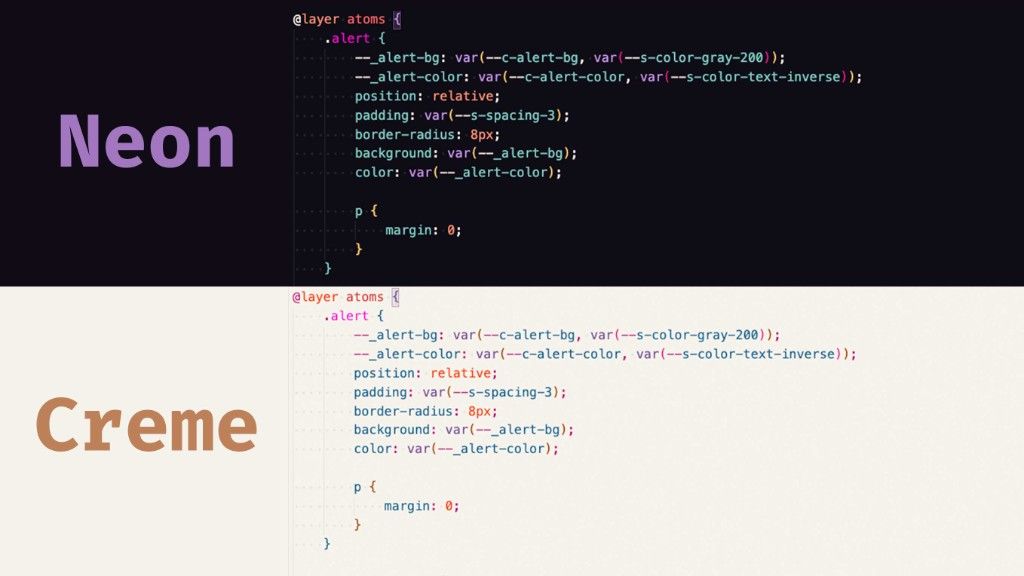
Sometimes you have this one of thing you are proud of, but you don't share it with the world. One of those thing is my color scheme that I use for my blog. I also started to use it in my IDE, and now you can too!
If you’ve been reading my articles for a while, you might have noticed the specific colors I use for the code snippets here on the blog. A little while ago, someone actually asked me about them, which got me thinking. I had already added a bunch of custom colors to my own local editor setup over time. So yeah… it just felt easier to package them all into a proper theme. Not just for sharing, but simply because it makes it so much easier to re-install if I ever need to set up a new machine. “Why not?”, right?
I ended up creating two versions: a dark one and a light one. Both themes are based on the Prism palette that I customized with custom properties for this blog. (They’re not 100% the same, had to make some decisions about the colors to use).
Utilitybend Neon
This is the vibrant, dark theme I use most of the time. It’s tuned for those winter or evening sessions writing HTML, CSS, and JS.
Utilitybend Creme
And for those who prefer a lighter editor, or just like switching things up during the day (I’m actually trying to do that more often myself), there’s a warm, light sibling.
I might make an IntelliJ theme for it in the future… if I find time.
I’m happy I added this in the marketplace, who know, maybe other people like it a well. If you decide to give them a try in your editor, let me know how it feels!